

Agenda timing
See planned time, current progress, warnings and overruns for each agenda item.
Chair Mode brings timing, participation, assurance, decisions and follow-through into one private live workspace for the person responsible for guiding the meeting.
Available with BoardCue for Organisations.
Using BoardCue personally? Explore BoardCue for Individuals →
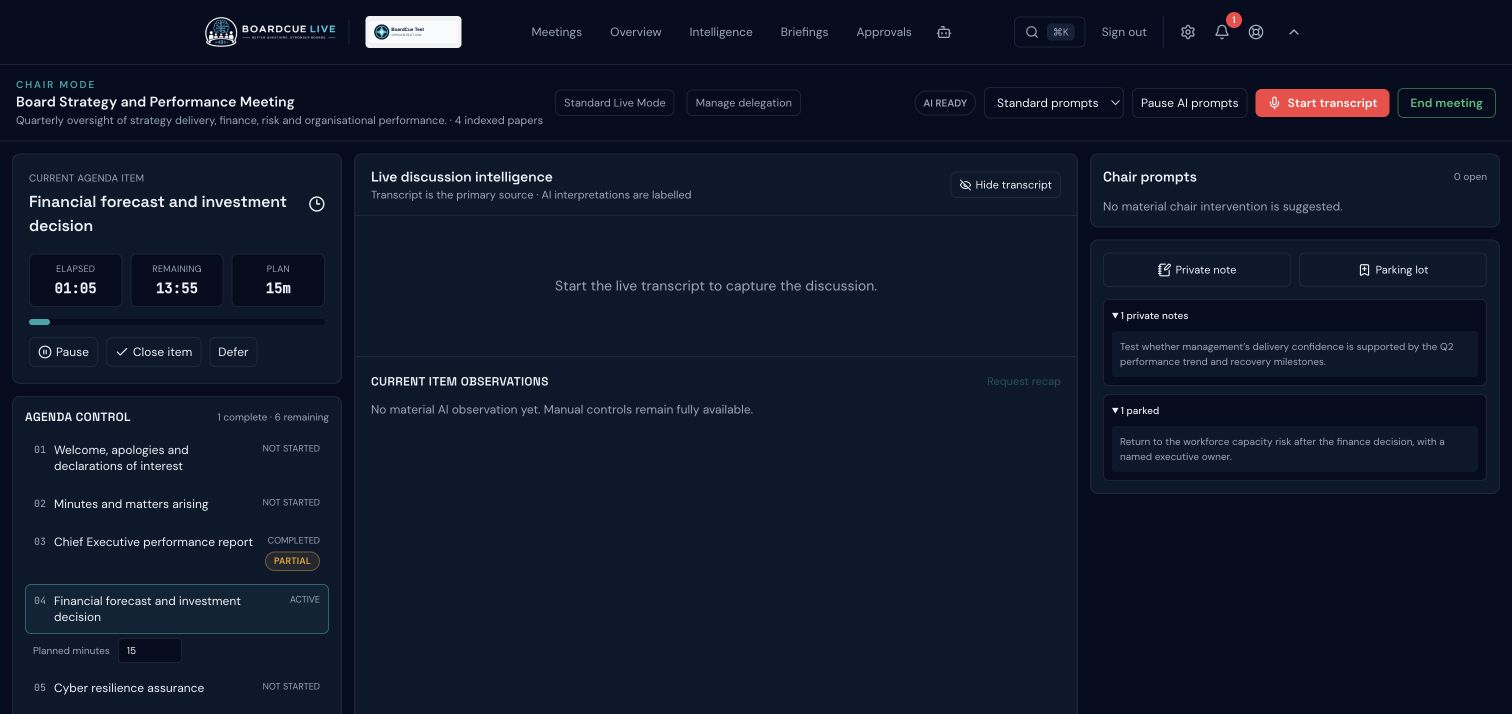
Current BoardCue Live interface · anonymised demonstration data
Chair Mode keeps the mechanics of the agenda and the substance of governance in the same line of sight. It is designed to reduce the chair's need to switch between a running order, personal notes, the live discussion and a separate action log.
See planned time, current progress, warnings and overruns for each agenda item.
Use participation indicators as a prompt to consider whether the discussion has heard from the right people.
See where the discussion may need a clearer conclusion, stronger evidence or an explicit statement of assurance.
Confirm the decision, action, owner and expected date before moving on.
Capture an important issue without allowing it to derail the current agenda item.
Keep personal prompts and observations visible only to the chair.
Support chair, deputy chair and temporary chair assignments for a meeting.
Review the agenda, planned timing, previous commitments and areas where the board may need a clearer decision or stronger assurance.
Keep the active item, live discussion, private prompts, participation indicators and emerging actions together without projecting the chair's workspace to the room.
Confirm what has actually been decided, who owns the follow-up, when it is expected and whether the board has stated the assurance it is taking.
Chair Mode provides information and prompts. The chair remains responsible for judgement, participation, meeting flow and the conclusions reached.